Home
Home

Devon's investigation into the gap between motion-control fidelity and graphical fidelity is awesome. Like any tech-heavy article, he's going to throw a lot of information at you, but he makes it all easily digestible. This is a must read for every gamer -- not just those interested in Microsoft's Kinect. During his dissection, Devon shares useful information and resources that will help any gamer find the perfect set up for their Wii, PS3, or Xbox.
High-definition motion controllers bring new possibilities, and with them, a new set of problems. You'll find plenty of discussion online about the space requirements for Kinect -- a subject many gamers already broached with the Wii. What you won't find is discussion of a brand-new, more nuanced problem specific to this forthcoming high-def hardware: your vision.
The basement of my house has become what some might call a "mancave." I have a modest 46-inch HDTV connected to my consoles and my PC. Until recently, I kept my futon about 12 feet from the screen, and it was from there that most of my gaming took place. Everything worked out beautifully -- except my computer.
Sure, the PC itself functioned well enough, but since it's the only device that utilizes all 1920 horizontal pixels, it was very difficult to see detail in some games, and it was nigh impossible to see text when browsing the web -- most web fonts are one or two pixels wide and two or three pixels high on the display. Seeing seven or eight square pixels out of more than two million on a 46-inch display from a distance of 12 feet is not a happy endeavor, even with the magic of corrective lenses.
It was then I realized that as displays become better, you need to be closer to them to see all that...er...betterness. The THX HDTV setup recommendations state that to find the optimum seating distance, you should "divide the size of your screen by .84." If you're starting from the viewing distance rather than the TV size, you can multiply by .84 for the opposite result. This means that a viewing distance of twelve feet -- my original set up -- would require a 120-inch screen to properly take in the splendor of the images present on screen. On the flip side, it also means that I should be about four to five feet from my 46-inch set. Since neither solution was workable, I looked around for some looser recommendations.
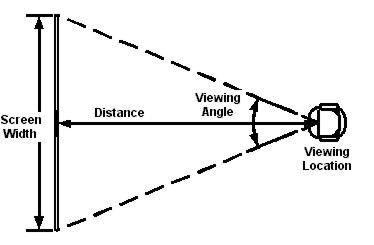
I found an online viewing-distance calculator which provides the hard-and-fast THX recommendations alongside a slightly more realistic recommendation based on a specification written by the Society of Motion Picture and Television Engineers. (This is the guideline I will be using for the remainder of this article.) I could see myself upgrading to a 60-inch screen at some point. That puts me at about eight feet for a happy viewing experience. I tightened my room up by sliding the futon closer to the screen -- the prescribed eight feet -- and now suffer much less eye strain. Once I do finally upgrade to the bigger set, I suspect I will have no problems whatsoever.
Perhaps this deserves a bit more explanation: Back in the days of standard definition, a 36-inch set was enough for almost any space. The picture on that set had 480 vertical lines of on-screen rendering composing the image. The pixels had to be large enough that those 480 lines filled the screen to create a single, unbroken image.
Today's high-definition displays pack 1080 vertical lines of pixels. In order to fit more than twice as many pixels on a display of the same size, the pixels need to be smaller. Tiny pixels are naturally harder to see. But the reason high definition looks better is because those extra pixels deliver additional detail that the fewer pixels of standard definition can't describe. Viewers don't need to be able to distinguish individual pixels, but they do need to be able to fundamentally register each one to get the full impact of the image -- most easily evidenced by my web-text example.
I'm skirting around the point that this is a consideration many people never make when buying a TV. Games haven't traditionally featured distance requirements between the player and the display. But the Wii broke new ground in that respect. Players now need to ensure they have space to fling their white, plastic remotes as they jump, shoot, and minigame their way to glory.
So, what's the difference? This is old news, right? Not if you factor in one of the biggest selling point of cutting-edge visuals: high definition. I could hook up a Wii to my grandparents' floor-model Admiral and still see every one of the Wii's 480 vertical pixels from across town. On the 360 and PS3, the lowest-resolution games are nearly twice that of the Wii, with a few games venturing further up the high-def ladder. Motion controls impose an "artificial" distance requirement on your living room set up, and as I squinted at my PC from afar, the mythical Wii HD is started to look much less attractive.
Microsoft has set the space requirements for Kinect at a reasonable six feet. This is not terribly difficult as this viewing distance merely requires a 45-inch diagonal-set measurement for proper viewing -- remember I'm the guy who has a TV with a standard-manufacturer measurement of 46 inches. It does, however, exclude those with 36-inch, 37-inch, and 42-inch displays, which are all relatively popular. If you're interested in complying with the THX spec, you're looking at a 54-inch display, even at this distance. Other sources claim more space is needed to play properly -- in fact, much more.
Giant Bomb's Jeff Gerstmann stated on the August 10 Bombcast that he recommends 13 feet in order to get the entire player into the Kinect's calibration frame (the discussion begins at around one hour and seven minutes). My second, more liberal HD recommendation source indicates that a 12-foot viewing distance needs an 88-inch screen. Needless to say, mere mortals like you and I will probably never own a screen of the size necessary to discern a 1080p display from 13 feet -- the Kinect's purported optimal registration range. But let's get a number, anyway, just for giggles.
This TV is only 82 inches diagonally. The model lady is present for scale.
That number is a staggering 96 inches (or 116 inches [120-inch manufactured screen] based on the official THX specs). Unless you plan on buying up the local movie theater and converting it into your personal gaming palace, you will most likely never properly play a 1080p game at a distance that is optimal for both the Kinect and the high-def game you're using it for (according to Gerstmann's hands-on recommendation).
Many of you may be wondering if this is really such a big deal. Of course, it's all a matter of perspective. For the hardcore, the anal retentive, or those like me who are lucky enough to be both, the thought of losing fidelity in a lovingly crafted game is an affront to our sensibilities. We painstakingly select a display which will best compliment our beloved pastime. We believe games are art and want to experience everything they have to offer. And for everyone else, it's a moot point.
It is akin to the VHS and DVD trend of so-called "fullscreen" movies -- which actually only displayed a portion of the frame at any given time. The majority of buyers didn't care about the artistic integrity of the director and merely wanted their SDTV filled from edge to edge with picture. But purists wouldn't hear of recklessly cropping a film in the name of practicality.
My concern is that it's all antithetical to the marketing message of "high-definition motion control." After all, high definition doesn't matter if the player is too far away to see it.