Bitmob 101.1: A Guided Tour Around the New Article Editor

Shoe_headshot_-_square
Thursday, February 25, 2010

We recently rebuilt Bitmob from the ground up...mainly to make it easier for you guys to post stories on Bitmob but also to help us prepare better for future development.

Since community member Tom Heistuman mentioned it in our Welcome to Bitmob 1.1 post, here is a quick tour of the new article editor for those of you who like writing here on Bitmob. If you're only here to read about games, don't worry -- this stuff's not for you.

First, you have to make sure you're registered or signed-in to Bitmob.com (real names only, please!). Once you are, check your Profile tab at the top. That's where you can create a new story or see the ones you've made already. From here, click "New Post." This is what you should see:
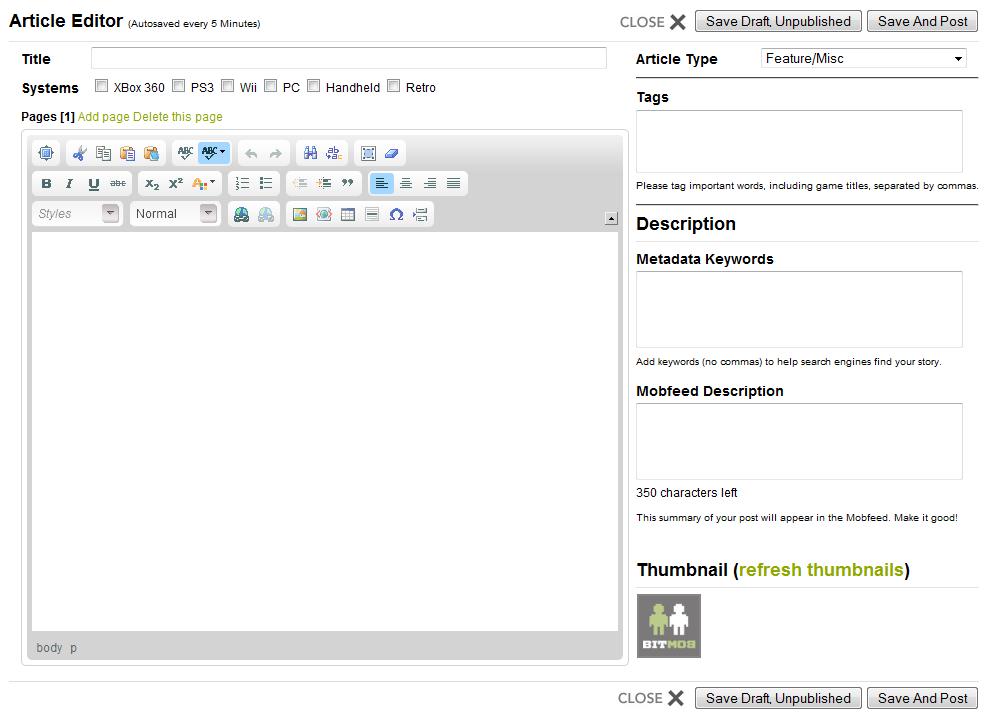
Article Editor


Let's look at this window piece by piece.

Title is where you enter the headline of your article. Keep it short and sweet, yet descriptive enough to entice people to click on it.

Click all platforms your story applies to. This way, your story will appear under the right filters in the navigation options at the top of Bitmob. (Note: The Retro tab is coming!)

If your article's getting too long, try adding pages to help break it up, so your readers aren't staring at a huge mass of text. Don't abuse this, however -- people don't like having to click to continue reading if they can help it.

Fairly obvious (we think): Close will close this window without saving (other than what the autosave picks up), Save Draft will let you save your progress without publishing the story yet, and Save and Post will make your story live in the Mobfeed for everyone to see.

Select what type of article you're creating: feature/miscellaneous (default), review, preview, news, interview, or video. In a near-future iteration of Bitmob, we'll let users sort by these categories as well, so identify your posts now to help people find them later.

If someone clicks on the "Halo" tag, it will pull up a list of every story tagged with "Halo." So make sure you enter relevant tags here, if you want your post to show up in the appropriate lists. This is mainly for game titles and doesn't work well with vague concepts (ex: "old games" or "games as art") because they're only useful if other people are using the same exact tags and wording.

This window has an auto-suggest function -- use those when you can, so you're not creating new tags that no one is using.

Metadata keywords are similar to tags, only they're for search engines. Enter in any words or phrases (no commas) that you think someone might use in Google to help find your article.

Give a quick summary of your story here, so when people are looking through the Mobfeed, they will know why they need to read your particular article.

After you add a few images to your post, hit "refresh thumbnails" -- pick one to be a tiny visual representation of your story in the Mobfeed. You can use the default "Bitmob" one if you'd like, but that may look too plain and generic if others are doing the same.

(continue reading to learn more about the whatchamacallit WYSIWYG editor)

 
1 2 Nextarrow
Problem? Report this post
BITMOB'S SPONSOR
Adsense-placeholder
Comments (20)
Default_picture
February 25, 2010

Great post 

Brett_new_profile
February 25, 2010

Fun fact I learned from Dan Hsu: WYSIWYG can be pronounced "wizzywig," and it is incredibly fun to say.

Alexemmy
February 25, 2010

Is there a way to go into html view if we want? I couldn't find one, and the WYSIWYG view added a space and wouldn't let me remove it. Probably would have been able to get rid of it in html mode as I usually can when that happens over on blogspot.

Default_picture
February 25, 2010

We can't allow people to add their own html code it would be a security risk. 

37893_1338936035999_1309080061_30825631_6290042_n
February 25, 2010

What happened to the "subscribe to the comments" feature? That was really helpful and I don't see it anymore.

Mikeshadesbitmob0611
February 25, 2010

Speaking of "real names only", are there plans to enforce this? I've seen a lot of people with fake or single names "sniping" in comments. If I'm putting myself out there to get flamed for every article I write, then I'd like my flamers to have to put their real names out there too.

Andrewh
February 26, 2010

How do we update the time on a post? I tried to post an unpublished article in the mobfeed, and it went way back... Was that an issue with having saved it before the transition, or will we have to publish immediately so it doesn't get buried?

Default_picture
February 26, 2010

Quick comment on the new page numbering; when I click on the arrow or page number to go to other pages in an article, I'm brought to the bottom of next page instead of the top, so I always have to scroll up/hit home in order to continue reading.

Alexemmy
February 26, 2010

I second Brian's comment. If there is a quick fix for that it'd be much easier.

New site looks great though Rich and Ryan and anyone else I don't know who worked on it. And thanks Shoe for putting this post together to help explain things.

Default_picture
February 26, 2010

@Michael We try to get everyone to enter in there real name, and we try our best to enforce this. If you ever find a comment that offends please click the comment report button so our mod will make sure to see. Thanks

Default_picture
February 26, 2010

@Brian thank you for the heads up and we will take care of that for you. 

@Andrew I am looking into this issue as well.

Default_picture
February 26, 2010

When I logged in from this post, I was redirected to the main page. It should just refresh my current page, no?

Also, I really hate clicking "2", or "3", or ">" to keep reading an article. Scrolling is EASY. Finding a tiny number or arrow with a trackpad is NOT. Please try not to use it! At the very least, add a ginormous NEXT link.

Default_picture
February 26, 2010

Thanks for the run-through, Dan. The new editor gives us a lot of graphical options to incorporate into our articles. I'm most impressed with the insert new page option. It will take some time to get the hang of when a page break is appropriate, but I feel it might make the posts on BitMob feel a bit more "legitimate." Perhaps only because the formatting is so professional, but still.

Default_picture
February 27, 2010

Great post Dan! I was rather lost playing around with the way faster blog editor.

Default_picture
February 27, 2010

Thanks for the great knowledge & wisdom! Very nice editor.

Just a tiny recommendation, if it won't hurt to say: It would be convenient if "logging in" would take you to the place you were instead of taking one to the front page of a feed.

Franksmall
February 28, 2010

@Shoe- I love the revamp, but am having trouble commenting or hitting the 'like' button on my iPhone.
Just wanted you to know.


Thanks for such an amazing site!

Default_picture
February 28, 2010

Yeah I hope to get the "Subscribed to Comments" checkbox back as well. It's easier for those who comment a lot to keep track with responses.

Img_20110311_100250
February 28, 2010

The editor is improved, but Ctrl-B doesn't shortcut to Bold print anymore. Also, I can't turn off bold if it is on unless I highlight some word and make it un-bold. It is frustrating. 

March 01, 2010

This new blog editor works like a dream (fast and easy). I barely had to tinker at all and when I chose to I didn't need to book an appointment weeks in advance to make the needed edits. Kudos on this aspect of the redesign.

Default_picture
June 02, 2010

I can't figure out how to embed Youtube vids... I copy and paste the URL of the vid into the dialog that pops up when I click the Embed button, but the final article treats it as if nothing is there.

You must log in to post a comment. Please register if you do not have an account yet.