
Fable 3 (PC) save game bug: Why I'm glad I'm an IT guy

Jayhenningsen
Tuesday, May 24, 2011

A few weeks ago, I fired up the PC version of Fable 3 and started to review it. I tried to put all the negative comments I’d read about this title in the back of my mind, and I was actually impressed with this game initially. The graphics remained true to the stylized art direction of the Fable series but looked even better on my PC monitor. The excellent sound effects and music really seemed to fit with the world, which was now seeing an industrial revolution. The first hour or so set up the plot, taught me the controls without being overbearing, and gave my character motivation for his upcoming quest. Everything seemed good.

Fable 3, after you play through the opening sequences, introduces you to a headquarters of sorts that enables you to do many things with your character. It allows you to change clothing and equipment, quickly travel to other locations, and save your game. It’s this last option where the game royally screwed up and flushed my enjoyment down the toilet.


The first time I attempted to save my progress manually, I was immediately met with a message that stated my file was corrupt. My experience in working on computers has taught me -- among other things -- to never give up after one failure. So, I tried again. It failed. I tried to save in another slot. It failed yet again. After about 6 attempts, I just gave up and decided to see if the autosave that the game recorded for me would let me jump back in where I left off.

Alas, it was not to be. As the files attempted to load, a message again informed that it could not load my corrupted file, and the game forced me to start over from the beginning. This did not make me happy.

The fun thing about reviewing PC games that both have embargos and haven’t been released yet is that you don’t have normal tech support resources at your disposal. You don’t have forums where you can post your problems, and if you actually let the general public know about your issue, you risk the wrath of the publisher. As a result, on May 10 (a full week before the scheduled release date), I took what I felt was the next and only logical step: I composed an email to the PR person who sent us the review code.

Though I felt my email was polite, respectful, and pretty clearly stated that this bug made it nearly impossible for me to review the game, I still have not received a reply. Since I generally enjoy solving puzzles (and I didn’t have many other options), I decided to tackle this one for myself. The good news is that I managed to solve my own problem. The bad news is (at least for Lionhead and Microsoft Game Studios) that after fixing, breaking, and fixing this issue again to prove that I correctly identified the root cause, I believe that my saving problems are the result of poor programming.
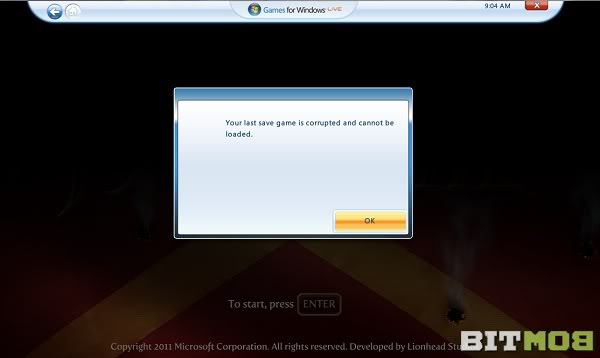
Fable 3 Last Save Game Corrupted

The company I work for provided the laptop I use on a daily basis. Because of this, my installation of Windows 7 is a bit different than that of the average home user. In a nutshell, my documents and settings are redirected to a company server, so they can be backed up and restored in the event that my laptop malfunctions in some way. When I’m not connected to my business network, I work off of a local copy of this data. Fable 3, it its current state, is completely incompatible with this type of setup.

Now, I find a bit of irony in this because Fable 3 is a Microsoft Game Studios title. After all, who should know better about how Windows functions than Microsoft? I also think it’s a bit naïve to assume that everyone who plays this title on a PC is not going to use settings similar to mine, especially when you consider that the average age of a gamer in the United States is now 35. I’d venture to say that I’m not the only gamer in corporate America right now.

I have to admit that I haven’t yet finished this game (so my opinion may change), but I’m genuinely still enjoying Fable 3. I just can’t shake the profound disappointment I’ve had with this endeavor both from the bug itself and the complete lack of support from the only contact I had. I feel sorry for anyone else who may encounter this issue because it makes it nearly impossible to continue playing. I’m glad that my experience in IT helped me fix my own problem, but in all honesty, I shouldn’t have had to.

 
Problem? Report this post
BITMOB'S SPONSOR
Adsense-placeholder
Comments (12)
100media_imag0065
May 24, 2011

I ran into a few problems before and was ignored by the game company. With GTA4 specifically. About 30 hours into it the game crashed and when I re-booted the game it would not let me continue my story. I could not load anything. So I decided to e-mail Rockstar and tell them the problem. I asked if they could at least send me a save, and gave them a brief description of where I was at in the game, hoping the could just replace my saved game or something.

I was ignored for two weeks. Finally I sent another e-mail. It said pretty much the same thing, but at the end I wrote. "I am talking to friends who are all having a similar problem, we have also all been ignored by you when we plead for assistance. Now I may not know a lot about how the law works, but I've been told I can sue you".

I got a reply in 2 hours. They apologized and they fixed my problem.

Imbarkus_picard_avatar
May 24, 2011

Well written Jay.  It's funny because I have used my IT experience to help rescue save games for my daughter in her adventures with Sims 3, and have found more resources assembled by other frustrated Sims players than I have by EA themselves.  Nothing can be more frustrating than to reach out for help and find only silence.  And nothing seems to put you outside of the realm of "tested scenarios" more than moving your program install or saved game install to somepl;ace other than the default.

Recently, I also had an experience with Steam for Mac which, for some unknown reason, installs its games into a User folder rather than Applications or some other shared folder.  Since my son and I share a lot of Steam games purchased individually for each of our accounts, this led to multiple downloads and installs both on our Mac.

Long story short, DON'T try to relocate Steam program files and leave a symbolic link behind pointing to the new location!  In fact, my experience in general is to just accept default install locations where at all possible, because we're lucky if even that has been fully tested.

Thanks for the warning Jay!

Jayhenningsen
May 25, 2011

My wife loves the Sims, so I share some of that pain. I can't tell you how many times I've had to fix various iterations of that game.

Default_picture
May 28, 2011

Hello Jay,

You say that you've found a solution for this problem, I really would like to know how you solved the corrupted save game problem for fable 3 PC.

thank you.

Jayhenningsen
May 28, 2011

I didn't solve all instances of corrupt saved games. I just fixed the inability to save the game at all. To solve my specific issue, I had to create a local user on my computer to log on and play the game with. Unfortunately, unless you're using a corporate installation of Windows 7 like I am, this probably won't solve your problem.

If you'd like to provide more details about your problem and how it happened, I might be able to offer suggestions, though.

Default_picture
May 28, 2011

my friend installed his fable 3 pc game at Steam,  he downloaded all windows updates, he downloaded the downloadable content so we can play co-op, now he can play co-op but he can not save any game because it's corrupted. Lionhead will fix this probably soon with patch. But stil, this is not annoying because he cannot save any games.

oh and his operating system is windows XP 64 bit

Jayhenningsen
May 28, 2011

What I would probably do first is create a new username on the computer, log in with that name, and try to play the game again. That will at least eliminate one possible problem.

Default_picture
June 05, 2011

Hey Jay...I am experiencing the same issue as this person whom you replied to and I did create a new user profile and this did not work for me, I used the Microsoft tool that records the program actions when services and registries are being accessed I believe that its the PML or thats the files it creates nonetheless, anyways it seems that it saves fine the issue comes to loading, when it goes to load it loads all but two files correctly, the two main files however the path shows up like, C:/Program Files/Fable 3 C:/Documents and Settings/Shizoma/Shizomas Games/Fable 3, as it is trying to use this entire string as the path to the save it is wanting to load, I did do my best to search for registry entries concerning this but to no avail I am on windows xp 64 bit edition and each and every save game is corrupted according to this game, so the first day I lost over 6 hours of game play before i realized, although i was creating save files, i did not try to load. Thank you any help would be appreciated. Of course everything i have put here could be wrong as I am an artist and not a programmer!

Jayhenningsen
June 06, 2011

Art C - Sounds like your problem is a bit different than mine. if it's truly concatenating those two file paths like that, this is likely something that can't be fixed without a patch from Lionhead. I've searched for registry entries and config files and come up with nothing as well.

Unfortunately, since Microsoft decided to take this control away from us, it seems like there is no way for the user to fix it.

Sometimes people are able to delete their autosave, but leave the other files intact and it fixes their problem. Have you tried this yet?

Default_picture
June 16, 2011

Hey Jay, Just wanted to update you...I tried your other solution to no avail unfortunately....you want to know how i got this to work.....I edited my boot.ini and brought in my trusty xp32 bit drive as a backup hitter for my 64 bit version of windows. Now I have a dual boot system happening....I do not often like to use the 32 bit as a 3d modeler and animator as the processing power and the access to RAM is significantly subpar, however if it means not having a 60 dollar paperweight then I am more than glad to do so. Anyways still no patch from Lionhead....sorry, but with a game breaking issue like this also taking place on the so called "supported" version of windows 7 64 bit, I think that it is poor customer service.....heck the save game glitch (corruption) has been around since the 360 version launched many months ago. It is a fun game but I feel they should provide a tad bit more support to those loyal Lionhead fans whom are willing to play the game no matter what it takes. Thank you so much Jay for your input.

Jayhenningsen
June 16, 2011

No problem. Sorry your couldn't get it to work on your Windows 7 machine. It's a shame that they're doing such a poor job with the PC version, because it's pretty good when it actually works.

Default_picture
July 05, 2011

Hey Jay, first of all - well said!

Secondly, I am on the verge of punching someone in the face. This problem has happened to me now 4 times. I play for hours hoping it would say ' save file corrupted' but low and behold, it happens. I’m using windows 7 proff 64; please just give me some indication to what I can do.

Windows live really drives me crazy, they don’t support my region (South Africa) even though South Africa IS listed in their ' supported countries' file. Plus I can’t download the updates or patches, connect to LIVe or save my games. Oh, and you can’t email anyone because my country is appertly not supported even though they say it is.

Please help me!!!!!!!!!!!!!!!!!!!!!!!!!

You must log in to post a comment. Please register if you do not have an account yet.